
Application Settings
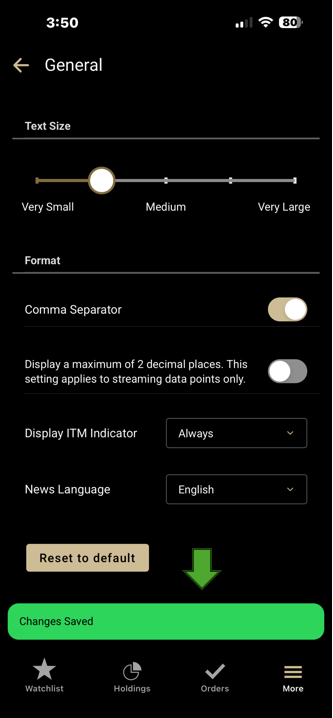
What's new: A confirmation message now
displays when changes are successfully saved in
Settings.
Why it matters: You now receive
immediate feedback confirming that your preferences have
been saved, providing greater confidence that your
changes were applied successfully.
Holdings
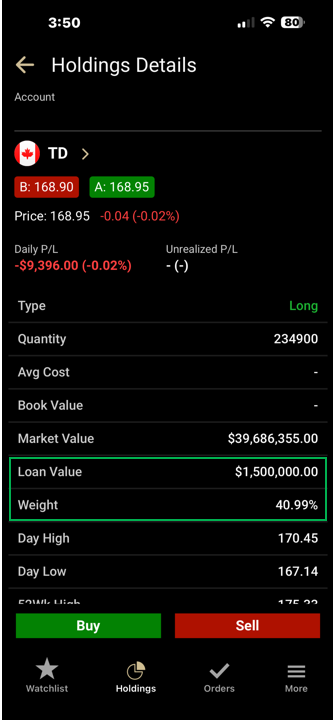
What's new: Enhanced the Holdings
Details view to include the Loan Value and Weight
metrics.
Why it matters: Portfolio weight helps
you better understand how each holding contributes to
your overall portfolio allocation.
Order Status
What's new: Enhanced mobile app
synchronization to automatically refresh order
information when returning to the app after activity
occurs in desktop.
Why it matters: Orders placed or
canceled from desktop are now reflected more
consistently in the mobile app, helping ensure you see
the latest order status and activity without needing to
manually refresh.
Chart
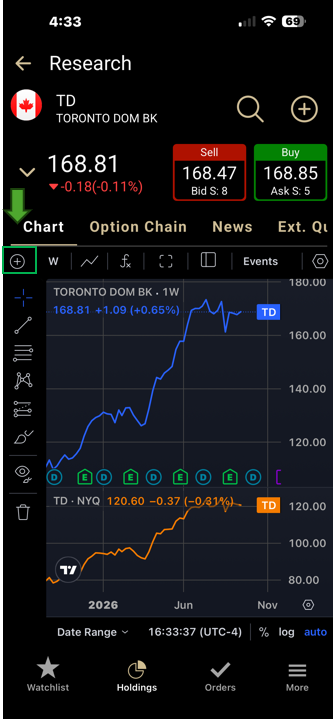
What's new: Added Comparison Feature
like desktop, allowing you to compare multiple
securities directly on the same chart.
Why it matters: You can now compare the
performance of different securities in a single view,
making it easier to identify trends, evaluate relative
performance, and conduct research without switching
between multiple charts.
Additional Enhancements
Analysis
- Charts have been enhanced to display stock split events more accurately.
- Accessible chart has been enhanced for French-language screen readers.
Platform Improvements
- Unregistered users attempting to sign in to Advanced Dashboard Mobile will now see a redirection message with a link to registration instructions.
- Improved accessibility support on Android devices for TalkBack screen reader.
Portfolio
- Enhanced Holdings Account Metrics to distinguish between unavailable data and actual account values.
- Holdings Details now automatically updates position quantities.
Settings
- Settings now reset stock and option quantity preferences correctly in French.
- Settings now restore the default dollar amount with the correct format when using Reset to Default.
Trading
- When fractional trading is unavailable, orders entered with fractional shares will display the message: "Fractional trading is currently unavailable."
- Order Status now displays newly submitted orders at the top of the list.
- Option Chain now provides clearer messaging for expired options.
- Order Entry now returns you directly to the originating screen after submitting an order.
- Enhanced Order Entry for Options and (OTA) workflows to ensure the selected action is retained based on your order settings and position.
- Order Entry now displays Estimated Value for Trailing Stop Limit conditional orders across all order legs.
- Order Status now maintains a more consistent order sequence when switching between accounts.
- Order Status now refreshes order details more reliably when returning to the app.
Watchlist
- Updated column labels and naming conventions to improve consistency across templates and platform views, including corrections to 52-Week High/Low and Analysts column labels.
- Watchlists accessibility has been enhanced with additional screen reader improvements.
- Watchlists have been enhanced to improve column header interactions.
- The Watchlist 52-Week Range column has been enhanced for French-language users.
- Market Movers has been updated with improved country labeling.